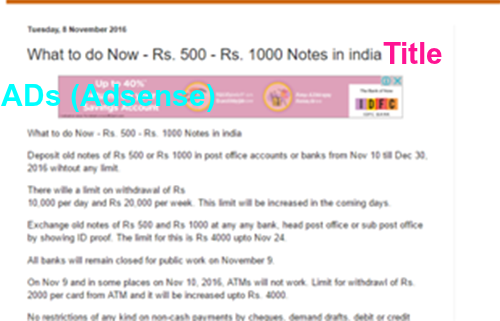
Add Adsense code below blog title as per the procedure provided in this post:
Generating
Adsense Code
1.
Sign-in to your Adsense account.
2.
Click on 'Content' then 'Ad Units' then '+New Ad Unit'.
3.
Provide name of Ad Unit.
4.
Select Ad Size
·
Responsive (Automatic Size)
·
Leaderboard (728x90 : Width x Height))
·
Large Rectangle (336x280)
·
Medium Rectangle (300x250)
·
Large Skyscraper (300x600)
·
Large Mobile Banner (320x100)
5.
Ad type
·
Text and Display Ads
·
Display Ads only
·
Text Ads only
6.
Text Ad Style (Set Text Ad Style as per your
requirement)
7.
Create
New Custom Channel (For grouping your Ad
Units as per its size or its placement in your page or its color)
8.
Backup Ads (To show ads from other source when google do not show targeted ads)
9.
Now you will get Ad Code as provided below:
<script async src="//pagead2.googlesyndication.com/pagead/js/adsbygoogle.js"></script>
<!--
fdcashback-below title -->
<ins
class="adsbygoogle"
style="display:block"
data-ad-client="ca-pub-11111111111111"
data-ad-slot="111111111"
data-ad-format="auto"></ins>
<script>
(adsbygoogle =
window.adsbygoogle || []).push({});
</script>
10.
This code will not work in BlogSpot.com. You
need to parse it before using it. Use any online parse tool to do so. After
parsing the code, Now above code will look like as follow:
<script async
src="//pagead2.googlesyndication.com/pagead/js/adsbygoogle.js"></script>
<!-- fdcashback-below title
-->
<ins
class="adsbygoogle"
style="display:block"
data-ad-client="ca-pub-111111111"
data-ad-slot="7207018688"
data-ad-format="auto"></ins>
<script>
(adsbygoogle = window.adsbygoogle ||
[]).push({});
</script>
Inserting Adsense Ad code into blogspot
11.
Open blogger and select your blog
12.
Click on Template
13.
Click on Edit HTML
14.
click anywhere in the html code, Take care - Do
not delete any text in html code
15.
Then 'Control F' for searching
16.
Search <data:post.body/>
17.
There may be more than one <data:post.body/>
18.
Just leave first one and choose second one and paste
parsed code above <data:post.body/>
19.
Save template.

After saving blogger template, you can see adsense ads below your title of the each post.
Above mentioned procedure can be used for setting ads from other advertisers like Chitika, Infolink etc.


